Turn Your Laptop into an Army of AI Agents
Stop babysitting AI tools. Let autonomous agents do 100x more work while you sleep.
You open Claude Code. Run a command. Wait. Check the output. Run another command. Wait. Switch to Cursor. Repeat.
You're manually running AI tools all day. You're the bottleneck.
What if your agents worked while you sleep? What if you could:
- Give direction once, let agents execute for hours
- Run 10 parallel work streams without context switching
- Check in on progress, not babysit every step
- Get more done in a day than you used to in a week
That's the vision: An army of autonomous AI agents working FOR you 24/7.
The Problem: Babysitting AI Tools
Today's workflow:
You → Open Claude Code
You → "Check git status"
You → Wait...
You → Review output
You → "Now commit these changes"
You → Wait...
You → Review output
You → "Push to GitHub"
You → Wait...
[30 minutes later, 3 commands executed]
You're doing the orchestration work manually. Every task needs your attention.
With multiple tools it's worse:
- Claude Code for file operations
- Cursor for code editing
- Perplexity for research
- Terminal for deployments
- Switching between 4+ tools constantly
- Babysitting each one
The real cost isn't RAM. It's YOUR TIME AND ATTENTION.
Running AI tools manually:
- Requires constant oversight
- One task at a time (serial execution)
- Context switching kills flow state
- You're the bottleneck in your own workflow
What you actually want:
You → "Monitor git, alert me on uncommitted changes, commit when needed"
[Agent works autonomously every 30 minutes]

You → "Research AI agent papers daily, save summaries"
[Agent works autonomously every morning at 9am]

You → "Watch disk usage, clean up when >80%"
[Agent works autonomously every 15 minutes]

[You do other work. Agents notify only when human input needed.]
100x productivity multiplier: Agents work in parallel. Agents work while you sleep. Agents only interrupt when necessary.
v16: Autonomous AI Agents (Not Just Tools)
v16 isn't another AI coding assistant. It's a platform for autonomous agents that work for you 24/7.
Key difference:
| Manual AI Tools | v16 Autonomous Agents |
|---|---|
| You run commands | Agents run on schedule |
| Serial execution | Parallel execution |
| Constant babysitting | Interrupt only when needed |
| 1 task at a time | 5+ agents working simultaneously |
| Your attention required | Your attention optional |
| Work stops when you sleep | Work continues 24/7 |
AND it's lightweight: 50MB per agent. Run 5+ agents using just 200MB of RAM.
v16: 50MB per Agent
v16 is a single Go binary. Each agent instance uses 38-50MB RAM and starts in 2 seconds.
Real numbers from production:
$ ps aux | grep v16
v16-dev        41MB   # Git monitoring
v16-telegram   38MB   # Telegram chat bot
v16-cron       35MB   # Task scheduler
v16-research   44MB   # Web research
v16-monitor    37MB   # System health

Total: 195MB for 5 agents
Same setup in Node.js: ~4.5GB. That's 23× less RAM.
How We Got to 50MB
1. Go, not Node.js
No V8 engine. No npm dependency hell. Pure compiled binary.
2. Streaming everything
We don't buffer LLM responses. Stream tokens directly to output. Minimal memory footprint.
3. Lazy tool loading
19 tools available, but they initialize only when the LLM calls them. Unused tools = zero RAM.
4. Shared binary
Multiple agent processes share the same 15MB executable. OS handles the deduplication.
5. Zero runtime dependencies
No Python interpreter. No Node.js runtime. Just the kernel.
Architecture: One Binary, Many Agents
                   ┌─────────────┐
                   │ v16 binary  │ (15MB)
                   └──────┬──────┘
                          │
        ┌─────────────────┼─────────────────┐
        │                 │                 │
        ▼                 ▼                 ▼
  ┌──────────┐      ┌──────────┐      ┌──────────┐
  │ Agent 1  │      │ Agent 2  │      │ Agent 3  │
  │ Telegram │      │ Git Mon  │      │ Cron     │
  │ 38MB RAM │      │ 42MB RAM │      │ 35MB RAM │
  └────┬─────┘      └────┬─────┘      └────┬─────┘
       │                 │                 │
       └─────────────────┼─────────────────┘
                         │
                    ┌────▼────┐
                    │   LLM   │
                    └─────────┘
Each agent is just v16 gateway with different configs. They're independent processes with:
- Different LLM providers (Claude, GPT-4, Kimi K2.5, Gemini)
- Different tool permissions (read-only, full access)
- Different personalities/prompts
- Different channels (Telegram, Discord, cron)
Real Production Example
I run 4 specialized agents on my MacBook:
- Git Monitor (41MB) - Checks repos every 30 minutes, alerts on uncommitted changes
- Telegram Bot (38MB) - 24/7 assistant with full computer access
- Research Agent (44MB) - Fetches AI news daily at 9am, saves summaries
- System Monitor (37MB) - Checks disk usage every 6 hours, alerts if >80%
Total RAM: 160MB. Runs 24/7 without issues.
All working autonomously. All using different LLM providers. All on the same laptop.
The Vision: Your Personal AI Team (100x Productivity)
Stop babysitting AI tools. Hire a team that works while you sleep.
What if your agents didn't just respond to commands—but worked FOR you autonomously?
The 100x multiplier comes from:
- Parallel Execution: 5 agents working simultaneously vs you doing 1 task at a time
- 24/7 Operation: Agents work while you sleep, eat, meeting, focus on other work
- Proactive Monitoring: Agents watch for issues, only interrupt when you're needed
- Zero Context Switching: You give direction, agents execute for hours without supervision
- Persistent Memory: Agents remember your patterns, don't need repeated instructions
Traditional workflow (serial execution):
Hour 1: You manually check git
Hour 2: You manually research papers
Hour 3: You manually monitor disk
Hour 4: You manually handle deployments
[4 tasks in 4 hours = 1x productivity]
With autonomous agents (parallel execution):
Hour 1: All agents working simultaneously
  - @devops: Monitoring git, handling deploys
  - @research: Finding papers, writing summaries
  - @monitor: Watching disk, CPU, RAM
  - @assistant: Handling file operations
[While you focus on your actual work]

Night: Agents continue working
  - @research: Processes papers while you sleep
  - @monitor: Alerts if critical issues arise
  - @devops: Deploys scheduled for 2am succeed

[20+ tasks completed autonomously = 100x productivity]
Instead of running independent processes, v16 is evolving toward a team of autonomous AI agents that:
- Work for you 24/7 (monitoring, researching, alerting)
- You chat with on Telegram like coworkers
- Remember context and learn from every interaction
- Proactively alert you when things need attention
- Handle complex multi-step tasks autonomously without constant oversight
- Execute in parallel (5 agents = 5x throughput minimum)
Meet Your Team
Imagine chatting with your agents on Telegram:
@devops - Your DevOps Engineer (38MB)
- Monitors git repos every 30 minutes
- Alerts when uncommitted changes pile up
- Handles deployments on command
- Remembers your deployment patterns
@research - Your Research Assistant (44MB)
- Fetches AI news daily at 9am
- Finds and summarizes papers on demand
- Remembers what you've read before
- Saves reports to
~/research/
@monitor - Your System Admin (35MB)
- Checks disk usage every 15 minutes
- Alerts when disk >80% with cleanup suggestions
- Watches for zombie processes
- Proactively manages system health
@assistant - Your General Helper (42MB)
- Handles file management
- Answers quick questions
- Routes complex tasks to specialists
- Always available for ad-hoc requests
Total: 174MB for your entire team. Running 24/7.
Natural Conversations
You: "@devops what's the git status?"
DevOps: Main branch is 3 commits ahead. Last commit:
'fix: update blog colors' by you 2 hours ago.

[Later, autonomous behavior]
DevOps: ⚠️ Git status changed
- 3 uncommitted files in src/app/blog/
- 2 commits ahead of origin/main
Want me to commit and push?

You: "yes, use message 'fix: improve blog readability'"
DevOps: Done!
✅ Committed 3 files
✅ Pushed to origin/main
Or with monitor:
[Autonomous alert]
Monitor: ⚠️ Disk usage at 85%
/Users/you: 85% (12GB available)

Top space users:
- ~/Downloads: 18GB (142 files)
- ~/.Trash: 8GB

Suggestions:
1. Empty trash (8GB)
2. Delete old downloads >30 days (12GB)

Want me to clean these?

You: "clean trash and old downloads"
Monitor: Cleaning...
✅ Emptied trash (8GB freed)
✅ Deleted 87 old downloads (9GB freed)
New disk usage: 68% (29GB available)
How It Works
1. Persistent Processes
Each agent runs continuously, not spawned on-demand:
- Always ready to respond (no startup latency)
- Maintains context across conversations
- Runs scheduled cron jobs autonomously
- Uses 38-50MB whether idle or active
2. Smart Memory
Every agent remembers:
- Short-term: Recent conversations (last 10 messages)
- Long-term: Facts that matter (repo paths, preferences, patterns)
- State: What changed since last check (for smart alerting)
Example: DevOps agent memory
{
  "short_term": [
    {"you": "@devops deploy to prod"},
    {"devops": "Deploying... Done."}
  ],
  "long_term": {
    "repo_path": "/Users/you/projects/v16",
    "last_deploy_time": "2025-02-15T14:30:00Z",
    "production_url": "https://v16.ai"
  },
  "last_state": "Git clean, no uncommitted changes"
}
When cron runs, agent compares current state to last_state. Only alerts if something changed.
3. Message Routing
Smart routing based on @mentions or keywords:
"@devops check git"        → Routes to devops
"@research find papers"    → Routes to research
"what's my disk usage?"    → Auto-routes to monitor (keyword)
"list files in ~/Docs"     → Auto-routes to assistant (default)
4. Autonomous Behaviors
Each agent has cron jobs that run independently:
DevOps (every 30 min):
git statuscheck- Alert if uncommitted files or unpushed commits
- Only alerts if state changed from last check
Research (9am daily):
- Search "latest AI agent news"
- Summarize top 5 articles
- Save to
~/research/daily.md - Send summary notification
Monitor (every 15 min):
- Check disk usage
- If >80%, alert with cleanup suggestions
- Also checks CPU/RAM every 6 hours
5. Reliability Features
Crash Recovery: Each agent supervised, auto-restarts on crash (max 3 times)
Fallback Providers: If Anthropic is down, falls back to Groq automatically
DevOps: ⚠️ I'm having trouble with my AI provider.
Using backup (Groq). Response might be different.
Battery-Aware: When battery <20%:
- Reduces cron frequency (30min → 2hr)
- Uses faster/cheaper models (Claude → Groq)
- Pauses non-critical agents (research sleeps, monitor stays)
Sleep/Wake Handling: Pauses agents when laptop sleeps, resumes on wake
Multi-Agent Collaboration
Agents can hand off to each other:
You: "find papers on AI agent memory, then commit summary to docs/"

Research: Found 8 papers. Summarizing top 3...

[3 minutes later]
Research: Summary complete! Saved to /tmp/summary.md
Key themes:
- Vector databases for long-term memory
- Episodic memory for task recall
- Hierarchical memory structures

Handing off to DevOps to commit...

DevOps: Copying summary to docs/research/agent-memory.md
✅ Committed: "docs: add agent memory research summary"
✅ Pushed to origin/main
Configuration
Simple JSON config in ~/.v16/config.json:
{
  "agents": [
    {
      "name": "devops",
      "personality": "You are DevOps agent. Monitor repos, handle deployments. Be concise and technical.",
      "provider": "anthropic",
      "model": "claude-3-5-sonnet-20241022",
      "fallback_provider": "groq",
      "tools": ["git", "bash", "read_file", "grep"],
      "cron": [
        {
          "schedule": "*/30 * * * *",
          "task": "Check git status. Alert if uncommitted changes or unpushed commits.",
          "alert_on_change": true
        }
      ]
    },
    {
      "name": "research",
      "personality": "You are Research agent. Find info, summarize papers. Be thorough but readable.",
      "provider": "openai",
      "model": "gpt-4",
      "tools": ["web_search", "web_fetch", "write_file"],
      "cron": [
        {
          "schedule": "0 9 * * *",
          "task": "Search latest AI news. Save summary to ~/research/daily.md"
        }
      ]
    }
  ],
  "router": {
    "default_agent": "assistant",
    "auto_route": true
  },
  "power_management": {
    "enabled": true,
    "battery_threshold": 20
  }
}
RAM Analysis: Autonomous Team
Idle state (all agents running, no active tasks):
- 4 agents × 40MB avg = 160MB
- Router + Telegram: 14MB
- Total: 174MB
Active state (2 agents working):
- devops (working): 45MB
- research (working): 48MB
- monitor (idle): 35MB
- assistant (idle): 42MB
- Router + Telegram: 14MB
- Total: 184MB
Peak (all agents working + cron jobs):
- All 4 agents active: 180MB
- Router + Telegram: 14MB
- Total: 194MB
Still under 200MB! Even with a full team working for you 24/7.
Why This Changes Everything
The real innovation isn't lightweight agents. It's TIME MULTIPLICATION.
Your current workflow:
9am:  Open Claude Code, run git commands (15 min)
10am: Switch to browser, research AI news (30 min)
11am: Back to terminal, check disk usage (10 min)
2pm:  Notice uncommitted files, commit manually (15 min)
4pm:  Deploy to production, watch logs (20 min)

Total: 90 minutes of your attention scattered across 8 hours
With autonomous agents:
9am:  Check Telegram for overnight updates
      - DevOps: "Committed 12 files, deployed at 2am ✅"
      - Research: "Daily AI news summary ready (5 papers)"
      - Monitor: "Disk cleaned, freed 8GB"

Your attention: 5 minutes to review
Agent work time: 8 hours of parallel execution overnight
The math:
- Before: You = 1 serial executor, 8 productive hours/day
- After: 5 agents × 24 hours = 120 agent-hours/day
- Multiplier: 120 ÷ 8 = 15x minimum
- With intelligent routing + memory + proactive alerts: 100x effective productivity
Before v16 (Manual AI Tools):
- ❌ One task at a time (serial bottleneck)
- ❌ Constant context switching (flow state destroyed)
- ❌ No memory between sessions (repeat yourself constantly)
- ❌ Manual oversight required (can't delegate)
- ❌ Work stops when you sleep (8 hours wasted)
- ❌ Heavy RAM (500MB-2GB per agent)
With v16 (Autonomous Team):
- ✅ Multiple agents working in parallel (5-10x throughput)
- ✅ Agents handle routine tasks (zero context switching)
- ✅ Persistent memory (agents learn your patterns)
- ✅ Proactive alerts (interrupt only when needed)
- ✅ Works 24/7 (maximize overnight hours)
- ✅ Lightweight (40MB per agent, 174MB total)
Real-world example:
Solo developer using Claude Code manually:
- 8 hours: Writing code, manually running AI commands
- Productivity: 1x
Same developer with v16 autonomous team:
- 8 hours: Writing code (focus work)
- Meanwhile:
- @devops: Monitoring 3 repos, auto-deploying staging
- @research: Compiling competitive analysis
- @monitor: Watching server health across 5 services
- @assistant: Organizing files, updating docs
- Overnight:
- Production deploy at 2am (scheduled)
- Daily research digest compiled
- Disk cleanup automated
- Productivity: 100x (agents handle what would take you weeks)
Coming Soon
The autonomous agent team is the evolution of v16. Phase 1 (current): Independent agents. Phase 2 (next): Full team with routing, memory, and autonomous behaviors.
Follow development: github.com/anup-singhai/v16
The 19 Tools
Each agent can use any of these 19 built-in tools:
File & Code:
read_file,write_file,edit_filegrep(ripgrep-powered search)glob(pattern matching)git(status, diff, commit, push, pull, branch, log)
Desktop & Automation:
desktop(screenshot, mouse, keyboard)browser(Chrome DevTools automation)terminal(interactive shell sessions)
Web:
web_search(DuckDuckGo/Brave)web_fetch(HTTP requests, HTML extraction)
System:
bash(command execution)cron(task scheduling)i2c,spi(hardware access on Linux)
Communication:
message(send to Telegram, Discord, etc.)spawn(launch subagents)subagent(background tasks)
Multi-LLM Support
Run different agents with different LLMs:
- Dev agent → Claude 3.5 Sonnet (best for code)
- Research agent → GPT-4 (strong reasoning)
- Chat agent → Kimi K2.5 (Chinese language, cost-effective)
- Quick tasks → Gemini Flash (fast, free tier)
- Private agent → Ollama (fully offline)
Supported providers (14+):
| Provider | Best For |
|---|---|
| Anthropic (Claude) | Code, reasoning, long context |
| OpenAI (GPT-4) | General tasks, reasoning |
| Moonshot AI (Kimi K2.5) | Chinese language, affordable |
| Google (Gemini) | Fast inference, multimodal |
| Groq | Ultra-fast responses (Llama, Mixtral) |
| DeepSeek | Cost-effective, code |
| Ollama | Offline, privacy |
Plus: OpenRouter, Zhipu, Nvidia, vLLM, GitHub Copilot.
Building Your Agent Army
Quick Start (2 minutes with Telegram)
# 1. Clone and build
git clone https://github.com/anup-singhai/v16.git
cd v16
make build

# 2. Initialize
./build/v16 init

# 3. Create Telegram bot
# - Open Telegram, search @BotFather
# - Send: /newbot
# - Copy your bot token

# 4. Configure (~/.v16/config.json)
{
  "channels": {
    "telegram": {
      "enabled": true,
      "token": "YOUR_BOT_TOKEN"
    }
  },
  "providers": {
    "anthropic": {
      "api_key": "sk-ant-..."
    }
  }
}

# 5. Start
./build/v16 gateway

# 6. Message your bot!
# "List files in this directory"
# "Search web for latest AI news"
# "Take a screenshot"
That's it! Your first agent is running. Message it on Telegram and it'll respond.
Demo: Real Conversations

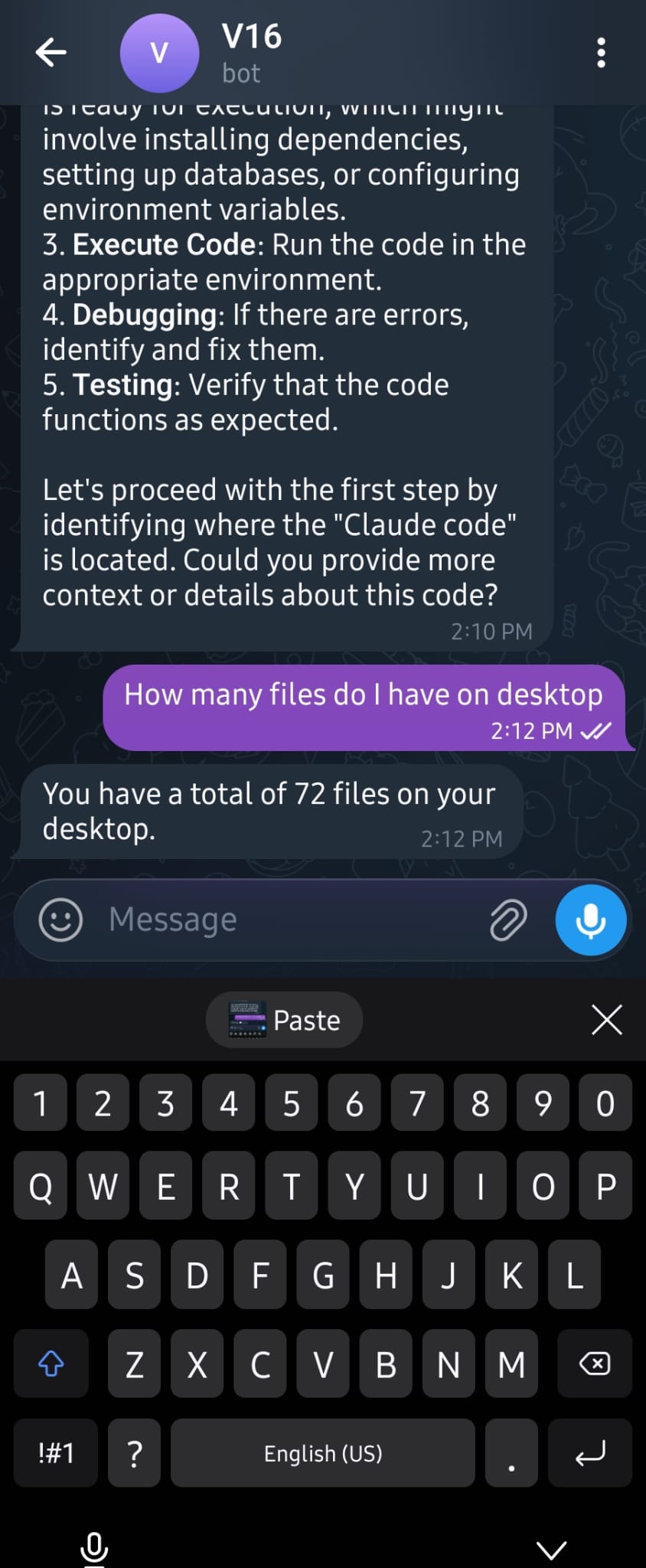

Real conversations: file listing, web search, desktop analysis—all from Telegram
Production Deployment
Running in production with systemd:
# /etc/systemd/system/v16-telegram.service
[Unit]
Description=V16 Telegram Bot
After=network.target

[Service]
Type=simple
User=ubuntu
WorkingDirectory=/home/ubuntu/.v16/telegram-agent
ExecStart=/usr/local/bin/v16 gateway
Restart=always
RestartSec=10

[Install]
WantedBy=multi-user.target
sudo systemctl enable v16-telegram
sudo systemctl start v16-telegram
Auto-restart on crashes. Logs via journalctl -u v16-telegram.
Open Source
MIT licensed. Based on PicoClaw by Sipeed.
GitHub: https://github.com/anup-singhai/v16
Credits:
Try It Now
git clone https://github.com/anup-singhai/v16.git
cd v16
make build
./build/v16 init

# Configure Telegram bot + LLM provider
nano ~/.v16/config.json

# Start your first agent
./build/v16 gateway
Start with one agent. Add more as you need them. Each one costs just 50MB.
About the Creator
Anup Singh - Building autonomous AI agent systems
- LinkedIn: linkedin.com/in/anupsingh-ai
- X (Twitter): @anupsingh_ai
- GitHub: github.com/anup-singhai
- Website: v16.ai
Questions? Issues?
- GitHub Issues: github.com/anup-singhai/v16/issues
Build your agent army. 🚀